Apple iCal, Google Calendar, CalDAV and SOCKS
May 21st, 2010 by ravi

A breakthrough in my long-running quest to reach Google Calendar via CalDAV through SOCKS from behind a firewall! If that’s a mouthful the solution is equally contrived, but quite worth it… for me.

The problem: iCal, Apple’s calendar client, is capable of connecting to Google Calendar via CalDAV (support for CalDAV was recently added by Google) but incapable of using the SOCKS/proxy settings in Mac OS X. Huh? Well, that’s Apple engineering for you.

The solution, for the unfaint of heart, assuming your SOCKS proxy is achieved using SSH:

Step 1

Tunnel port 443 (HTTPS) on your desktop to 443 on www.google.com:

ssh -D .... -L 443:www.google.com:443 ....

Step 2

Configure iCal. Fire it up, bring up Preferences, click on “+”  under Accounts. Fill out as below, replacing your Google or Google Apps email address for “myemailaddress@gmail.com”:
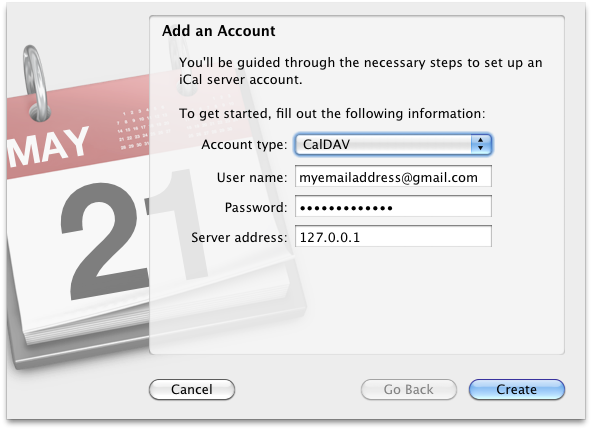
Clicking on Create will cause iCal to whine about not finding the server or calendars. Ignore that and click again to proceed to the next screen:

The full Server Path (obscured above) is: /calendar/dav/myemailaddress@gmail.com/user/ (the email address, as mentioned earlier, should be replaced with yours).
And that’s it.

One Response  
  • Jeff Geerling writes:
    October 13th, 2010 at 2:02 pm

    I have been looking all over for this, and I’m now 99% of the way there. I’m getting a dialog saying that Google is rejecting my password when I try to log in. I’m wondering if this is because their server can see that I’m trying to authenticate against 127.0.0.1 instead of http://www.google.com... or if I’m just completely off here.

    I have my tunnel set up and port 443 forwarded, and iCal sometimes acts like it can see the calendar, but almost always says ‘server rejected username or password.’

    Any suggestions?


Leave a Reply


While I love to hear (read) your comments, if you are looking specifically for help with one of my software projects (such as my WordPress themes), please do not add a comment here, but instead click on the link below: Using that link, you might even find a previous report of (and solution for) the issue!
XHTML: You can use these tags: <a href="" title=""> <abbr title=""> <acronym title=""> <b> <blockquote cite=""> <cite> <code> <del datetime=""> <em> <i> <q cite=""> <strike> <strong> <pre lang="" line="" escaped="" highlight="">


SIDEBAR
»
S
I
D
E
B
A
R
«
»  Substance:WordPress   »  Style:Ahren Ahimsa